Star icon Limited Beta Access Star icon

Your Microsoft 365 Users Are Scattered Across Systems. We Fix That. Rectangle shape

IT teams waste 10+ hours weekly hunting for user information across Entra ID, HR systems, and spreadsheets.
CloudWerk UserManagement gives you one dashboard to see, manage, and control all user profiles—with role-based permissions your whole team can trust.

Microsoft Partner
Quick Setup
No Credit Card Required

Shape
Shape
UserManagement Dashboard
Mobile app

Microsoft Entra ID

Primary Integration

Microsoft Graph API

Azure SQL

OpenID Connect

OAuth 2.0

REST API

Star icon Integrations Star icon

Powered by Microsoft, Extended by You

Native integration with Microsoft Entra ID means your users are always in sync. Our REST API lets you connect UserManagement to your existing tools—HR systems, ticketing platforms, or custom workflows.

View API Documentation

On Our Roadmap

SCIM 2.0, HR System Connectors, SAML 2.0

Star icon The Problem We Solve Star icon

User Management Chaos Costs You
Time, Security, and Sanity

Scattered Data

User Data Lives Everywhere

  • Entra ID has identities, HR has job titles, spreadsheets have phone numbers
  • No single source of truth for employee information
  • New hires wait days while IT tracks down access requirements
  • Offboarding misses accounts because nobody has the full picture
Time Drain

Manual Processes Drain IT Resources

  • Hours spent copying data between systems
  • Role changes require touching multiple admin consoles
  • Audit requests mean emergency spreadsheet creation
  • Managers ask "who has access to what?" and you don't know
Security Gap

Permission Sprawl Creates Security Gaps

  • Users accumulate access as they change roles
  • No visibility into who can access what
  • Access reviews are painful quarterly fire drills
  • Departed employees retain access for weeks
Bottleneck

Everyone Asks IT for Basic User Info

  • HR needs employee lists with departments
  • Finance wants to know who reports to whom
  • Managers can't see their own team's profiles
  • IT becomes the bottleneck for every user question
Star icon How It Works Star icon

From Chaos to Clarity in Three Steps

Connect your Microsoft Entra ID tenant once, and UserManagement automatically syncs your user directory. No agents to install, no complex configuration—just connect and go.

Connect
01

Connect Your Entra ID Tenant

One-click OAuth consent to securely link your Microsoft 365 environment. Your data stays in your tenant—we just read what you authorize.

Enrich Profile
02

Enrich User Profiles

Add department details, phone numbers, locations, and custom fields that Entra ID doesn't track. Build the complete employee profile your organization needs.

Role Control
03

Control Access by Role

Assign team members to roles—HR sees HR fields, managers see their direct reports, IT admins see everything. Everyone gets exactly the access they need.

Star icon Current Capabilities Star icon

What's Working Today in Beta

Centralized User Directory

All your Entra ID users in one searchable, filterable dashboard. See names, emails, departments, and job titles without touching the Azure portal.

Live

Role-Based Access Control

Five pre-built roles from Super Admin to Employee. Control exactly who sees what user information based on their job function.

Live

Entra ID Integration

Secure OAuth connection to your Microsoft 365 tenant. Read-only sync keeps your directory current without manual updates.

Live

Multi-Tenant Architecture

Each customer's data is completely isolated. Perfect for MSPs managing multiple clients or enterprises with separate business units.

Live

Custom User Attributes

Add fields Entra ID doesn't support—desk location, emergency contact, T-shirt size. Configure what matters for your organization.

Live

REST API Access

Every feature available via API. Build integrations, automate reports, or connect to your existing tools.

Live
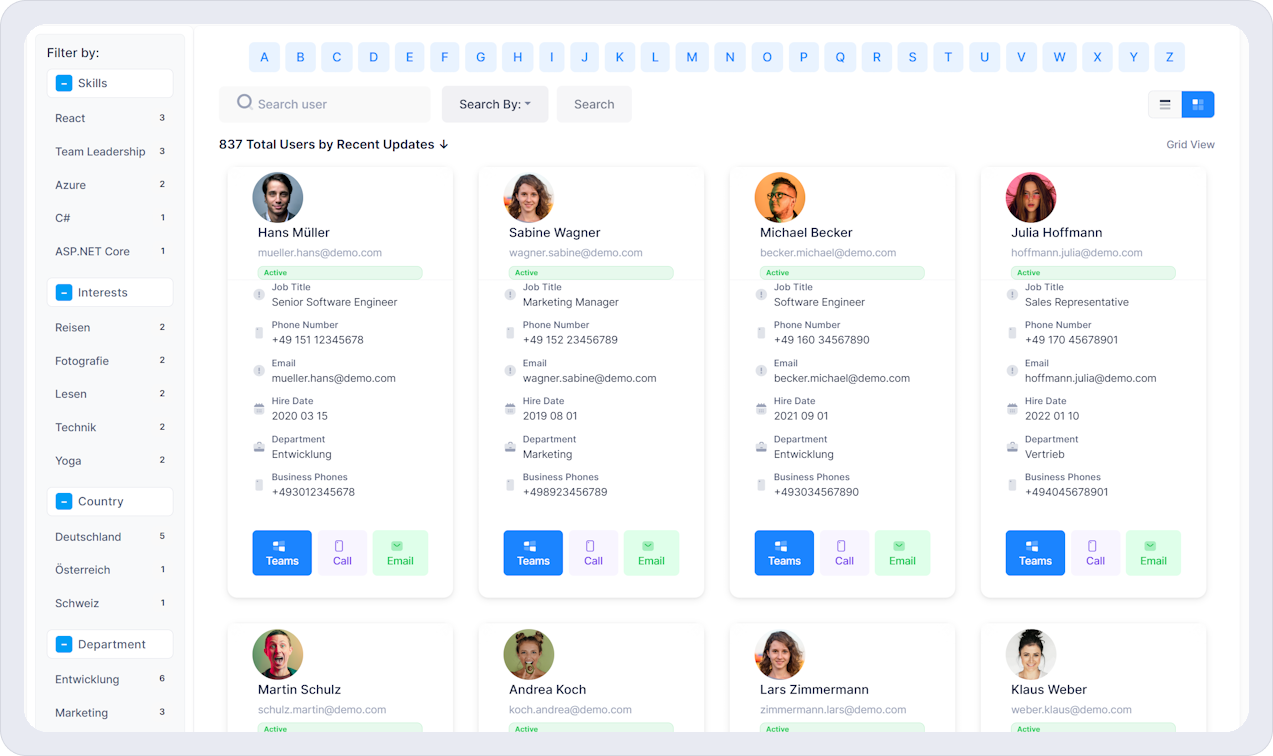
UserManagement Dashboard
Star icon Your Command Center Star icon

Finally See Your Entire User Directory in One Place

Stop switching between admin consoles. The UserManagement dashboard shows you every user, their roles, profile completeness, and last activity—all filterable, searchable, and exportable.

Instant Search & Filters

Find any user by name, department, role, or custom field in milliseconds

Profile Completeness Tracking

See which user profiles are missing critical information at a glance

What We're Building Toward

"Our target: IT admins spending 75% less time answering 'who is this person?' questions from HR and managers."

CloudWerk Product Team

Beta Goal

Vision

"We're designing for the IT manager who's currently maintaining three different user lists and hating every minute of it."

CloudWerk Product Team

Design Philosophy

Vision
Star icon Built on Enterprise Technology Star icon
Microsoft Partner
Azure Hosted
Beta Program
Security Focused
UserManagement App
Star icon Why CloudWerk Star icon

Enterprise-Grade Security Without Enterprise Complexity

Built by Microsoft 365 consultants who were tired of the same user management headaches. UserManagement is designed for real IT teams at mid-sized companies who need powerful features without a six-month implementation.

  • Multi-tenant isolation keeps your data completely separate
  • Azure AD authentication—no new passwords to manage
  • Role-based access with 5 pre-built permission levels
  • German-engineered, GDPR security foundations built-in
Explore Features
5

Pre-Built Roles

Super Admin to Employee

<1min

Sync Time

Entra ID to Dashboard

100%

Data Isolation

Multi-Tenant by Design

0

Passwords to Manage

Azure AD SSO Only

50
500
Microsoft 365
Star icon Who It's For Star icon

Built for IT Teams Managing 50-500 Microsoft 365 Users

You're too big for spreadsheets but too small for a full Identity Governance suite. Your users are in Entra ID, but that's just the starting point—you need richer profiles, better access control, and visibility into who has access to what. UserManagement fills the gap between "basic Azure AD" and "enterprise IAM platform."

See if you're a good fit

Join the Beta Waitlist

Limited spots available. We're onboarding beta customers in waves over the coming weeks.

  • No credit card required
  • Cancel anytime
  • Your data stays in your tenant
Star icon FAQ Star icon

Frequently Asked Questions

Have questions about CloudWerk UserManagement? Find answers to the most common questions below.

Q. What is CloudWerk UserManagement?

CloudWerk UserManagement is a comprehensive SaaS platform for managing user identities, access controls, and permissions across your organization. It provides enterprise-grade security with an intuitive interface.

Q. When will the beta be available?

We're onboarding beta users in waves. After registering, you'll receive an invitation within 2-4 weeks based on your position in the queue.

Q. Is there a cost during the beta?

Beta access is completely free. Early adopters will also receive special pricing when we launch our general availability.

Q. How does Entra ID integration work?

CloudWerk UserManagement integrates with Microsoft Entra ID for authentication and user data access. You can view and manage Entra ID users through a centralized dashboard with enterprise authentication features like SSO.

Q. What support is provided during beta?

Beta participants receive dedicated support via email and our community forum. We're committed to helping you succeed and gathering feedback to improve the platform.

Star icon Resources Star icon

Learn About User Management

Simplify User Management Join our beta - get early access
Get Started